Breville Oracle review: dual boilers, automatic tamping and hands-free milk with real buttons and dials
The Breville BES980XL Oracle Espresso Machine grinds, doses and tamps into a 58 mm portafilter, brews and steams at the same time from two boilers, and textures milk hands-free. It does all of that with physical buttons and dials instead of a touchscreen, which makes it quick to use once you know it, but it is heavy, slow to warm up and still asks for daily care.

Michael Reynolds
Hands-on review
Hands-on testing, research, specs
4 weeks
22 minutes
Jargon helpNew to espresso? Tap any dotted term to see what it means.
In this review
Yes, if you want café-quality espresso with very little skill, and you prefer buttons to a touchscreen. The Breville Oracle automates grinding, dosing and tamping, keeps a commercial-size 58 mm portafilter, and runs two boilers so the shot and the milk are ready together. The hands-free steam wand makes silky milk at a temperature you set with a dial, and the one-press americano is a nice touch. It is heavy, needs about five minutes to heat, and you still need to wipe, backflush and descale on schedule.
Breville Oracle at a glance
Breville Oracle pros and cons
- Automatic grind, dose and tamp with a polished puck
- Brews and steams at once on two boilers
- Physical buttons and dials that are quick to use
- Heavy, large body that needs a deep counter
- About five minutes to heat from cold
- No saved user profiles on the screen
Who should buy the Breville Oracle?
- Anyone who wants café drinks without barista skills
- People who prefer tactile buttons to a touchscreen
- Americano and flat white drinkers
- Small kitchens with low counter depth
- Households that want saved drinks for each person
- Hobbyists who want to tamp and steam by hand
First impressions of the Breville Oracle
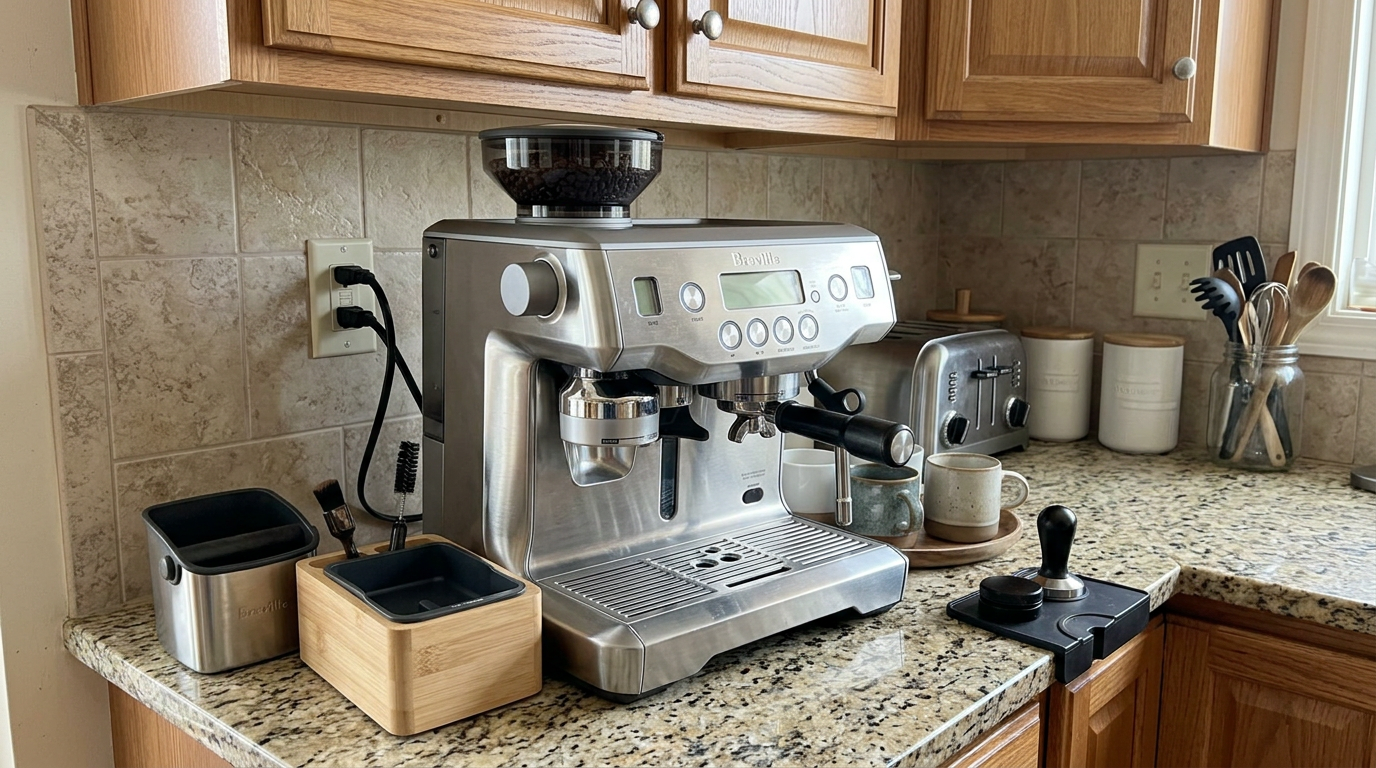
The Breville Oracle looks like a café machine that wandered into a home kitchen.
It's wide, tall and heavy, with a big brushed steel body, a full-size portafilter and a chunky steam wand.
What it doesn't have is a tamper or a milk thermometer, because it handles both of those jobs for you.
There's also no touchscreen.
Instead, there's a backlit LCD, a row of physical buttons and two dials for milk temperature and texture.
I liked that straight away.
After a day, I could make a flat white without looking at the screen, just by feel.
My first double shot came out with dense, hazelnut-colored crema and a sweet, chocolatey taste.
The milk, steamed at the same time, was glossy and smooth.
That's the Oracle's magic trick: espresso and milk from a proper café-style process, with almost none of the skill.
Over the following four weeks, it became the machine everyone in my house reached for first.
Nobody needed a lesson beyond where to put the portafilter and which lever starts the milk.
It isn't perfect, and I'll get to its weight, warm-up time and cleaning needs.
But as a way to get proper café espresso at home without learning to be a barista, it's hard to beat.
The Oracle needs a deep counter, and it rarely moves once it's in place.
What the Breville Oracle actually is
The Oracle is a dual-boiler espresso machine with an automatic grinder and tamper built in.
It sits between a manual espresso machine and a fully automatic one.
You still move the portafilter from the grinder to the group head by hand.
But you don't weigh, level, tamp or steam by hand.
Two boilers
One stainless steel boiler is dedicated to brewing.
It is controlled by PID✕PID controlA digital thermostat that constantly measures temperature and adjusts the heater in tiny steps, so the brew water doesn't drift., which adjusts the heater in tiny steps to stop the temperature from drifting during a shot.
The second boiler is dedicated to steam.
Because they work independently, you can brew and steam at the same time with no loss of temperature or pressure.
A heated group head
The 58 mm group head has its own heating element.
That keeps the water hot all the way from the boiler to the coffee, instead of losing heat into cold metal.
Our tip: Think of the Oracle as a café machine with a robot barista inside, controlled by buttons rather than a screen.
Breville Oracle design and setup
The Oracle measures about 16.1 inches wide, 14.7 inches deep and 17.8 inches tall.
It weighs around 35 pounds, so pick its spot carefully.
Hidden wheels
There's a clever detail behind the drip tray.
Turn a small dial and a roller drops down under the machine.
With the roller down, the whole 35-pound machine glides across the counter for cleaning.
Turn it back, and the machine sits firmly on its feet again.
A cup warmer
The top of the machine is a heated steel plate.
It uses warmth from the boilers to preheat cups, which stops a small espresso from losing heat into a cold cup.
Setup
I filled the tank, installed the soaked water filter and filled the hopper.
Then I set the date and time, tested my water hardness with the strip and let the machine heat up for about five minutes before the first shot.
Our tip: Drop the roller wheel before cleaning under the machine, because lifting 35 pounds over a counter is a two-person job.
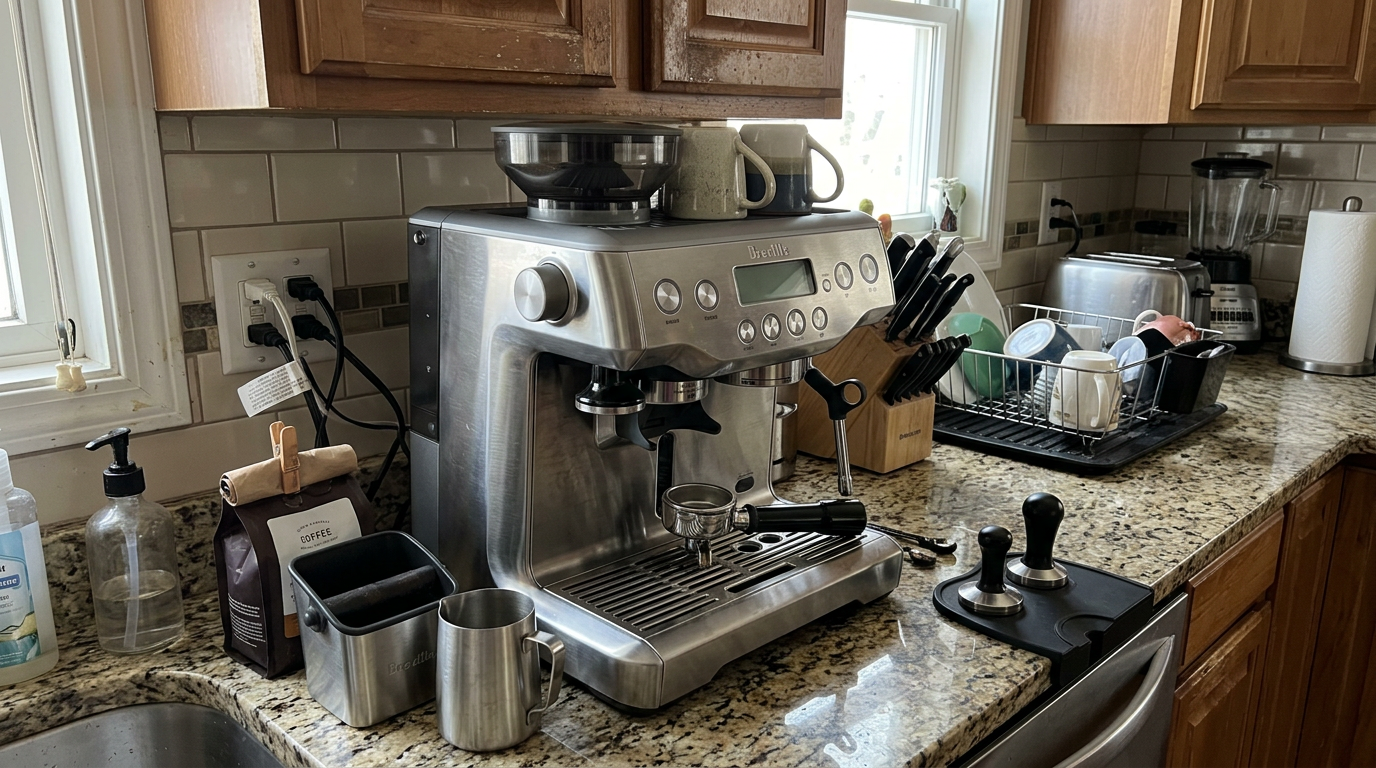
The physical buttons sit just below the LCD, within easy reach.
The water tank and what to fill it with
The 84-ounce tank is big, which means fewer refills.
There's a flip-down door on the front so you can pour water in without moving the machine from under the cabinets.
The tank also slides out of the back for a proper wash.
Water quality matters
The Oracle has a filter holder with a cartridge that reduces chlorine and organic compounds.
Water quality makes a bigger difference on a boiler machine than most people realize.
Espresso needs some dissolved minerals to extract flavor, and the boilers' level sensors rely on those minerals to work.
So never use pure distilled or reverse-osmosis water on its own.
| Your water | What to do | Why |
|---|---|---|
| Soft to moderate tap water | Use it with the filter | Good flavor, slow scaling |
| Very hard tap water | Filter it, consider a softer blend | Protects the boilers |
| Pure distilled or RO water | Don't use it alone | Flat coffee, can confuse sensors |
| Distilled plus a little tap | Around 80% distilled, 20% tap | Balanced minerals, less scale |
A good target is water with roughly 50 to 150 ppm of total dissolved solids.
If your tap water is very hard, mixing filtered tap water with distilled water keeps enough minerals for flavor while slowing down scale.
Our tip: Fill the tank from the front door with a jug, so you never have to pull a heavy machine out from under the cabinets.
Dual boilers and warm-up time
The Oracle takes about five minutes to heat from cold.
That's the price of two boilers and an actively heated group head.
Once it's hot, everything is ready together, and you never wait between brewing and steaming.
Time from cold start to full readiness, from my tests.
The auto-start
The Oracle has a programmable auto-start.
I set it for 6:45 every morning.
By the time I had made breakfast, the boilers were up to temperature and the heated group and portafilter were properly warm.
There's also an auto-off that you can set from one hour up to eight hours of idle time, which is handy when you have guests.
Thermal stability
Because the group head is heated, my first shot of the day tasted just as good as the fifth.
I never needed blank shots to warm the portafilter, as long as it was stored locked into the group.
Buttons, dials and the LCD
The Oracle's controls are refreshingly physical.
There are one-cup and two-cup buttons, a hot water button, an americano dial and two rotary dials for milk temperature and texture.
The backlit LCD shows a shot timer, menu options and maintenance alerts.
Why buttons work
Buttons are fast once you know them.
I could start a shot and set the milk without looking, which is harder on a touchscreen.
Physical controls are also simple and durable, with fewer things to go wrong over the years.
What you lose
There are no named user profiles.
If several people use the machine, everyone adjusts the dials for their own drink.
That's quick, but it's not as convenient as tapping your own name on a screen.
| Control | What it does |
|---|---|
| 1 cup and 2 cup buttons | Start a single or double shot |
| Hot water button | Hot water from a dedicated spout |
| Americano dial | Selects and starts an americano program |
| Milk temperature dial | Sets the target milk temperature |
| Milk texture dial | Sets the foam from silky to dense |
| Steam lever | Starts hands-free milk texturing |
Programming the Oracle
The menu gives you more control than the simple panel suggests.
Shot volume
You can program the one-cup and two-cup buttons with your own volumes.
The machine measures the water with an internal flow meter, so it stops at the same volume every time.
Brew temperature
The brew temperature can be adjusted in one-degree steps.
I used about 198 to 200°F for light, dense single origins and about 190 to 193°F for oily dark roasts.
The higher setting extracted more sweetness from light coffee, while the lower one kept dark roasts from turning harsh.
Pre-infusion
The default pre-infusion✕Pre-infusionA short, gentle soak at low pressure before full pressure. The coffee swells and fills tiny gaps, so water flows through evenly. is three seconds at low pressure.
During that time, the coffee swells and fills small gaps in the puck, which seals potential channels before full 9-bar pressure arrives.
Tamp and timers
You can adjust the tamping force for different beans.
And you can set the auto-start time and the auto-off delay.
| Setting | What I used | Why |
|---|---|---|
| Brew temperature, light roast | 198 to 200°F | More sweetness, less sourness |
| Brew temperature, medium roast | Around 195°F | Balanced default |
| Brew temperature, dark roast | 190 to 193°F | Less bitterness |
| Pre-infusion | 3 seconds | Even saturation |
| Auto-start | 15 minutes before coffee | Fully warm group head |
| Auto-off | 2 hours | Ready for a second round |
Our tip: Change the brew temperature by one or two degrees at a time and taste, because small changes are easy to notice on a boiler this stable.
The built-in grinder
The grinder uses hardened stainless steel conical burrs✕Conical burrsA cone-shaped burr turning inside a ring. The gap between them sets how fine the coffee is. that drop the grounds straight into the basket.
A dial on the side moves the burrs in small stepped increments.
Adjust safely
The most important rule: only turn the dial finer while the grinder is running.
On a stopped grinder, beans or fragments get trapped between the burrs as they close, which can strain the motor.
So I pushed the portafilter into the cradle to start the grinder, then turned the dial.
Stop a grind early
To cancel a grind mid-cycle, move the portafilter handle sideways to the right.
The motor stops immediately.
Purge after big changes
After a big grind change, some of the old grind is still in the burr chamber.
I ground and discarded one dose before judging the new setting.
Bars show how fine the setting needed to be.
Our tip: Purge one dose after every big grind change, so you're tasting the new setting and not the old one.
Automatic dosing and tamping
You insert the portafilter in the grinding cradle on the left and push it to the left to start.
The grinder fills the basket, adjusting the dose based on how dense the coffee is.
Then a motor-driven tamper compresses the coffee and finishes with a polishing twist.
When you pull the portafilter out, the puck is flat, smooth and level.
Why it matters
Uneven tamping is the most common reason for bad espresso at home.
It causes channeling✕ChannelingWhen water finds a weak spot in the coffee puck and races through it. The shot tastes sour and thin because most of the coffee is under-extracted., where water races through a weak spot.
Because the Oracle tamps the same way every time, any change in flow comes from the grind or the beans, not from your hand.
That makes troubleshooting much easier.
Less mess
Grinding and tamping happen inside an enclosed collar.
I barely had to sweep grounds from the counter all month.
| Step | By hand | On the Oracle |
|---|---|---|
| Dosing | Weigh each shot | Automatic, adjusts to the grind |
| Distributing | Tap or stir | Even fill from the chute |
| Tamping | Your hand | Motorized, consistent |
| Finishing | Optional | Automatic polishing twist |
| Cleanup | Grounds on the counter | Almost none |
Breville Oracle espresso performance
My standard was a double shot of about 2 fluid ounces in 25 to 30 seconds.
I put a warm cup on the tray, pressed the two-cup button and watched the shot timer on the LCD.
After the three-second pre-infusion, the shot started dripping, then poured in a steady, syrupy stream.
How it tasted
With fresh medium-roast beans, the crema✕CremaThe golden-brown foam on top of an espresso. It forms when pressure pushes gases and oils out of fresh coffee. was hazelnut-colored with tiger striping.
The espresso was sweet, heavy and smooth, with dark chocolate, caramel and a little dried fruit.
Why the 58 mm basket helps
For the same dose, a 58 mm basket makes a wider, shallower puck than a 54 mm one.
Water travels a shorter distance through it, and there's less risk of channeling along the sides.
In the cup, that showed up as a rounder body and a crema that lasted longer.
My scores out of 10 for a medium-roast double.
Fixing fast and slow shots
Because the tamp is constant, you only need to read the flow and adjust the grind.
Too fast
A fast shot pours quickly, looks pale yellow, has little crema and tastes sour or sharp.
The coffee isn't creating enough resistance.
Turn the dial to a lower number for a finer grind.
Too slow
A slow shot drips, looks black and syrupy, or barely comes out at all.
It tastes bitter and harsh.
Turn the dial to a higher number for a coarser grind.
| What you see | Cause | Fix |
|---|---|---|
| Fast, pale, sour | Grind too coarse | Lower number, finer |
| Slow, black drips, bitter | Grind too fine | Higher number, coarser |
| Good flow, then fast tail | Beans getting old | One step finer |
| Fine one day, slow the next | New, very fresh bag | One step coarser |
Bean age
As beans get older, they lose carbon dioxide and moisture, and shots speed up.
Over the life of a bag, I went one or two steps finer to keep the shot near 30 seconds.
Light roasts are denser and need a finer setting, while dark roasts are more brittle and need a coarser one.
Our tip: If one shot runs fast after a week of perfect shots, the beans are aging, so go one step finer rather than changing anything else.
The one-press americano
The Oracle has a hot water outlet right behind the group head.
That means it can make an americano in one go, without you moving the cup.
Programming it
I went into the menu, chose Americano Adjust and picked a memory slot.
The machine pulled the espresso, and I pressed Select when the shot reached the volume I wanted.
It then switched to hot water, and I pressed Select again when the mug was full.
From then on, one press of the americano dial made the whole drink.
How it tasted
The americano was smooth and full, with a thin layer of crema on top.
Because the water and espresso go into the same cup in sequence, it's as quick as a drip coffee.
| Drink | Espresso | Hot water |
|---|---|---|
| Short americano | Double shot | About 4 oz |
| Mug americano | Double shot | About 8 oz |
| Long black | Double shot | About 4 to 6 oz, water first |
Our tip: Save one americano slot for a small cup and one for a big mug, so you never have to stop it by hand.
Hands-free milk texturing
The steam wand is automatic and powered by its own boiler.
It has a temperature sensor in the tip area and a sensor plate in the drip tray.
You set the temperature and texture with the two dials, then let the machine do the work.
How I steamed
I filled the jug with cold milk to just below the spout.
I set the texture dial to the middle for a latte and the temperature to 150°F.
Then I lowered the wand into the milk until the jug sat flat on the drip tray, and pushed the steam lever down.
The wand injected air, built a swirling vortex and shut off by itself at the target temperature.
Settings
Milk temperature can be set from about 130°F to 170°F.
150°F is the default, and 170°F is there for people who like extra-hot drinks.
The texture dial runs from silky, low-foam milk for lattes and flat whites to tall, dense foam for cappuccinos.
Further right means more foam.
Automatic purge
When I lifted the jug and lowered the wand, the machine blasted steam through it to clear any milk inside.
I still wiped the outside straight away with a damp cloth.
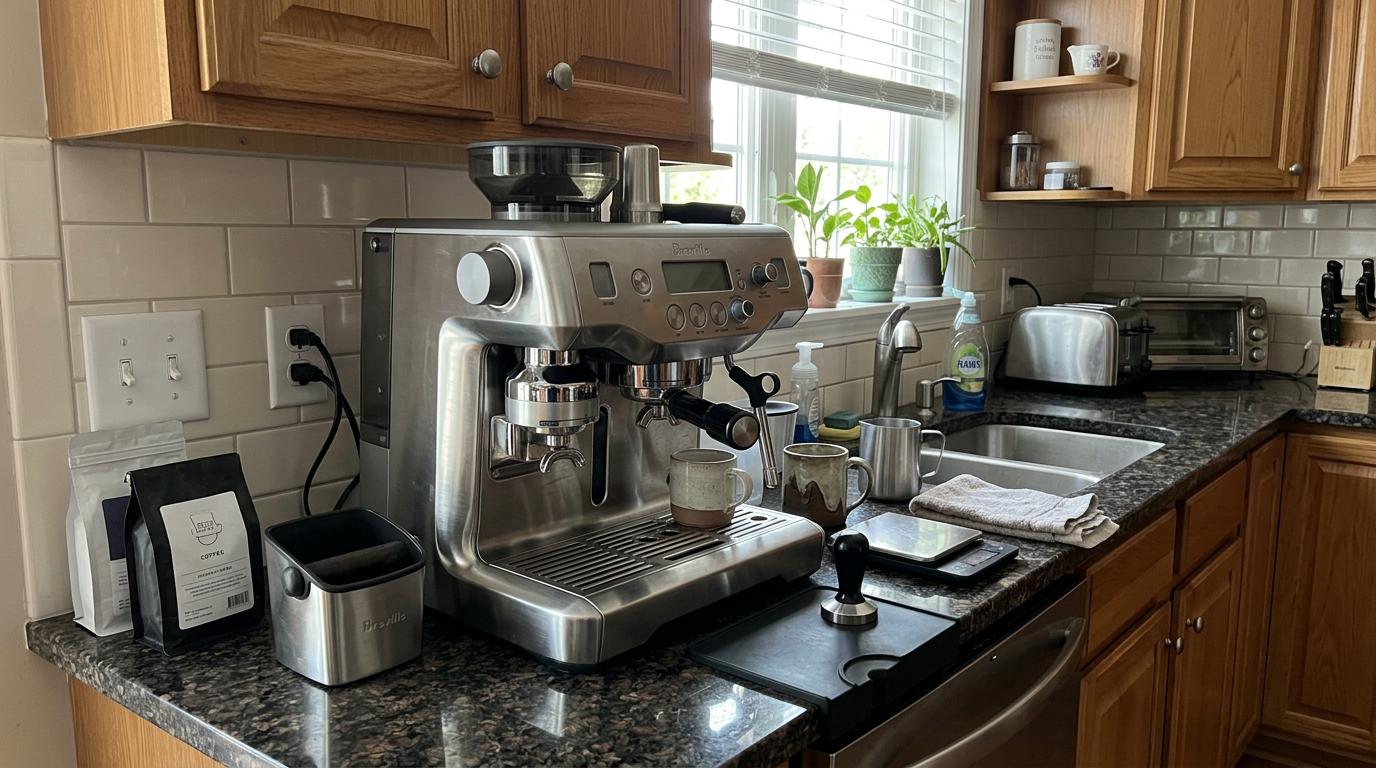
The steam wand lowers into a drip-tray sensor for hands-free milk.
Latte art with the Oracle
Many automatic machines make big, stiff bubbles that can't be poured.
The Oracle's wand makes real microfoam✕MicrofoamMilk foam with bubbles too small to see. It looks like glossy wet paint and blends into the coffee. instead, with bubbles too small to see.
At low and middle texture settings, the milk had the gloss and pourability of liquid paint.
How I poured
I pulled a double shot into a wide cup just before the milk finished, so the crema was fresh.
After swirling the milk, I held the cup at an angle and poured from two to three inches above in a thin stream.
That let the milk dive under the crema without turning it white.
When the cup was about half full, I brought the jug down to just above the surface and poured faster.
The white foam floated up, and I drew the pattern, finishing by lifting and cutting through the middle.
| Stage | Jug height | What happens |
|---|---|---|
| Base | 2 to 3 inches above | Milk sinks under the crema |
| Fill | Steady thin stream | Cup half full, still brown |
| Pattern | Just above the surface | White foam floats to the top |
| Finish | Lift and cut through | Locks in a heart or rosetta |
Our tip: Use the middle texture setting for latte art, because the highest setting makes foam too thick to pour a design.
The drink settings I used most
After four weeks, these were the settings I kept coming back to.
| Drink | Shot | Milk temperature | Texture |
|---|---|---|---|
| Espresso | Double, about 2 oz | N/A | N/A |
| Flat white | Double | 140 to 150°F | Low |
| Latte | Double | 150°F | Middle |
| Cappuccino | Double | 150 to 160°F | High |
| Extra-hot latte | Double | 170°F | Middle |
Plant milk
Barista-style oat milk foamed well at the middle texture.
Almond and soy were less stable, so I turned the texture up slightly.
Our tip: For a sweeter latte, keep the milk at 140 to 150°F, because milk tastes less sweet when it's very hot.
Cleaning and maintaining the Breville Oracle
The Oracle saves you work during brewing, but it needs regular cleaning to stay at its best.
Daily
Run a short one-cup flush without the portafilter after your last shot to clear grounds from the shower screen.
Wipe the basket dry between shots and wash it at the end of the day.
Wipe the steam wand after every milk drink and let the purge finish.
Empty the drip tray when the float pops up.
Weekly and monthly
Use the menu's clean cycle to backflush✕BackflushCleaning the group head by blocking the basket with a rubber disc so water and cleaner are forced back through the valve. with a cleaning tablet.
The machine pulses the pump on and off to push cleaner back through the valve.
Wash the water tank monthly and replace the filter every two to three months.
Descaling
Every six to twelve months, depending on your water, run the guided descale✕DescalingRunning a mild acid solution through the machine to dissolve mineral scale. Scale slows heating and can block small pipes. routine.
It cycles the solution through the group head, the hot water outlet and the steam wand, then rinses with fresh water.
| When | Task | Why it matters |
|---|---|---|
| After milk drinks | Wipe the wand, let it purge | Prevents baked-on milk |
| After the last shot | One-cup flush, wash the basket | Clears oil and grounds |
| Daily | Empty the drip tray | Stops overflow and smells |
| When prompted | Clean cycle with a tablet | Clears oil from the valve |
| Every 2 to 3 months | Replace the filter, wash the tank | Protects both boilers |
| Every 6 to 12 months | Guided descale | Keeps heating efficient |
My estimate of hands-on cleaning time per day.
Storage and transport
If you ever store the machine somewhere that could freeze, or ship it for service, drain the boilers first.
Empty the tank, remove the hopper, lower the wheel and lock the steam wand down before moving it.
Breville covers the Oracle with a two-year limited warranty.
What daily use is really like
With the auto-start set, the Oracle was always ready when I was.
I pushed the portafilter into the grinder, moved it to the group head, pressed two-cup and pushed the steam lever down.
Both were done within about 40 seconds.
Including the wand wipe, a flat white took under two minutes.
Back-to-back drinks
For guests, I could grind the next shot while one brewed and the milk steamed.
Two cappuccinos took about 90 seconds, and the boilers never sagged.
Water use
The 84-ounce tank lasted about three days for two people.
Rough maths from an 84 oz tank, allowing for flushes and purging.
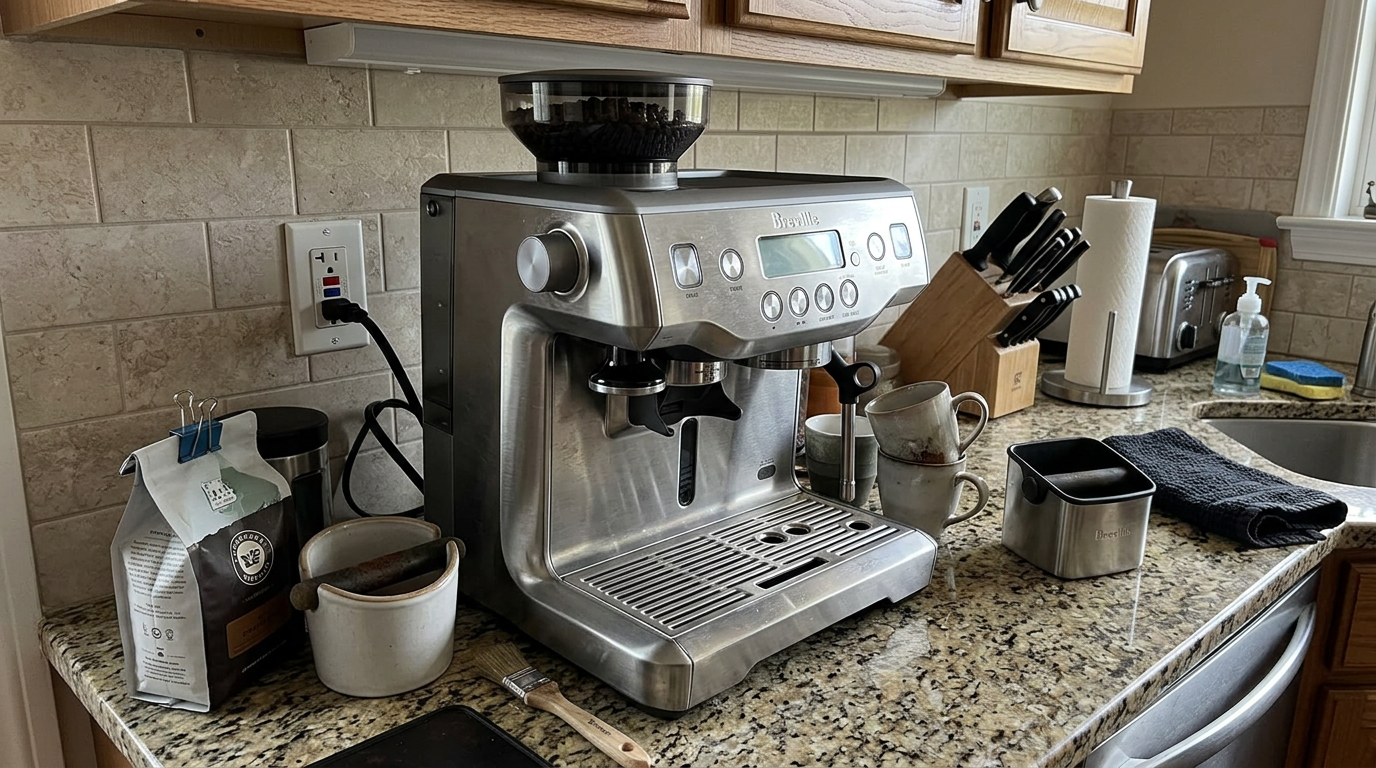
The heated top plate keeps a stack of cups warm and ready.
Our tip: Keep two or three cups on the heated top plate, so every drink starts in a warm cup.
My four-week shot log
I logged the time of every double shot for four weeks to see how steady the automation really was.
Week one
The first few days were about finding the right grind for my blend and learning the controls.
After four shots, I had a setting that ran close to 28 seconds.
Weeks two and three
In weeks two and three, the timer barely moved.
Most shots landed between 27 and 31 seconds, and I only touched the grind dial when a bag started to age.
Week four
In the last week, I tried a light roast.
It needed a finer grind and a brew temperature close to 200°F, then it was as consistent as the blend.
Share of shots inside my 25 to 30 second window, by week.
The heated group head deserves credit here.
Even the first shot of the morning landed inside the window, which is rare for a home machine.
Beans and milk
The Oracle rewards fresh whole beans.
Coffee roasted within the past few weeks gave the best crema and the most even flow.
Medium roasts are the easiest to dial in, light roasts need a finer grind and higher temperature, and dark roasts need a coarser grind and a lower temperature.
Very oily beans can leave residue in the grinder chute, so clean it more often if you use them.
| Bean type | Grind | Brew temperature |
|---|---|---|
| Light, dense single origin | Finer | 198 to 200°F |
| Medium blend | Middle | Around 195°F |
| Dark, oily blend | Coarser | 190 to 193°F |
For milk, cold whole milk gave the glossiest foam.
Barista oat milk was the best dairy-free option.
Our tip: Store beans in an airtight container away from light, and only fill the hopper with what you'll use in a few days.
Common mistakes to avoid
The Oracle is easy to use, but a few habits make a big difference.
| Mistake | What happens | Better habit |
|---|---|---|
| Turning the grind finer while stopped | Beans jam the burrs | Adjust while grinding |
| Not purging after a grind change | Next shot tastes like the old setting | Discard one dose |
| Using pure distilled water | Flat coffee, sensor errors | Use filtered tap water |
| Jug not on the sensor plate | Milk temperature off | Sit the jug flat |
| Skipping the wand wipe | Milk bakes on the steel | Wipe after every drink |
| Forgetting the auto-start | Five-minute wait | Program it once |
Change one variable at a time and taste after each change.
What I would change
Named user profiles would help households where several people use the machine.
A faster heat-up would make the Oracle easier to use without the auto-start.
And a lighter body would make it easier to move, even with the clever wheel.
How much time it really saves
The Oracle's biggest advantage over a manual machine is time, so I measured it.
I made the same flat white on the Oracle and on a manual setup with a separate grinder, a scale and a tamper.
On the manual setup, weighing, grinding, distributing, tamping, brewing, steaming and cleaning took about five minutes.
On the Oracle, the same drink took under 90 seconds, because grinding, tamping and steaming happen without me.
Time to make one flat white, start to first sip, from my tests.
Where the time goes
On the manual setup, most of the time goes on weighing, distributing and steaming by hand.
On the Oracle, the slowest step is simply walking the portafilter from the grinder to the group head.
Cleanup is quicker too, because there are no grounds to sweep and no tamper to rinse.
Over a week
For two drinks a day, that adds up to roughly 45 minutes saved every week compared with my manual routine.
It also means the quality doesn't drop on rushed mornings, which is when my manual shots are at their worst.
Our tip: If you're short on time in the morning, set the milk dials the night before, so the whole drink is two presses and one push of the lever.
Is the Breville Oracle worth the money?
The Oracle is a premium machine, but it replaces a lot of equipment.
To get the same espresso from a manual setup, you'd need a dual-boiler machine, a separate grinder, a scale, a distribution tool and a good tamper.
The Oracle puts all of that into one body and removes the skill barrier.
Compared with Breville's touchscreen flagship, it keeps the same core hardware, including the dual boilers, PID control, 58 mm heated group, auto-tamper and hands-free steam wand.
The main thing you give up is the touchscreen and saved profiles, and many people prefer buttons anyway.
Ask yourself three questions.
Do you want automated café drinks? Do you prefer physical controls? And do you have a deep, sturdy counter?
If yes, the Oracle is an excellent choice.
In Europe, the same machine is sold as the Sage Oracle.
How it compares with other espresso setups
The most useful comparison is with the kinds of machines you're likely to consider.
The Breville Oracle stands out for pairing automation with a real 58 mm heated group head.
| Feature | Oracle | Semi-automatic all-in-one | Fully automatic bean-to-cup |
|---|---|---|---|
| Grinding and tamping | Automatic | By hand | Automatic, internal brew unit |
| Portafilter | 58 mm, heated group | 54 mm | None |
| Boilers | Two | One heater | One heater |
| Brew and steam together | Yes | No | Usually no |
| Milk | Hands-free wand | Manual wand | Automatic frother |
| Controls | Buttons and dials | Buttons or screen | Screen |
| Espresso quality | Excellent | Excellent, skill-dependent | Good |
Fully automatic machines use small internal brew chambers, usually 51 to 54 mm, that can't build the same body and crema.
Their milk systems also tend to make stiff foam that doesn't pour well.
Semi-automatic machines can match the Oracle's espresso, but only with skill, time and practice every morning.
| You mostly drink | Is it a fit? | Why |
|---|---|---|
| Espresso | Excellent | 58 mm puck, heated group, two boilers |
| Flat whites and lattes | Excellent | Simultaneous hands-free milk |
| Americanos | Excellent | One-press program |
| Drinks for several people | Very good | Fast, but no saved profiles |
| Hands-on barista hobby | Fair | Most steps are automated |
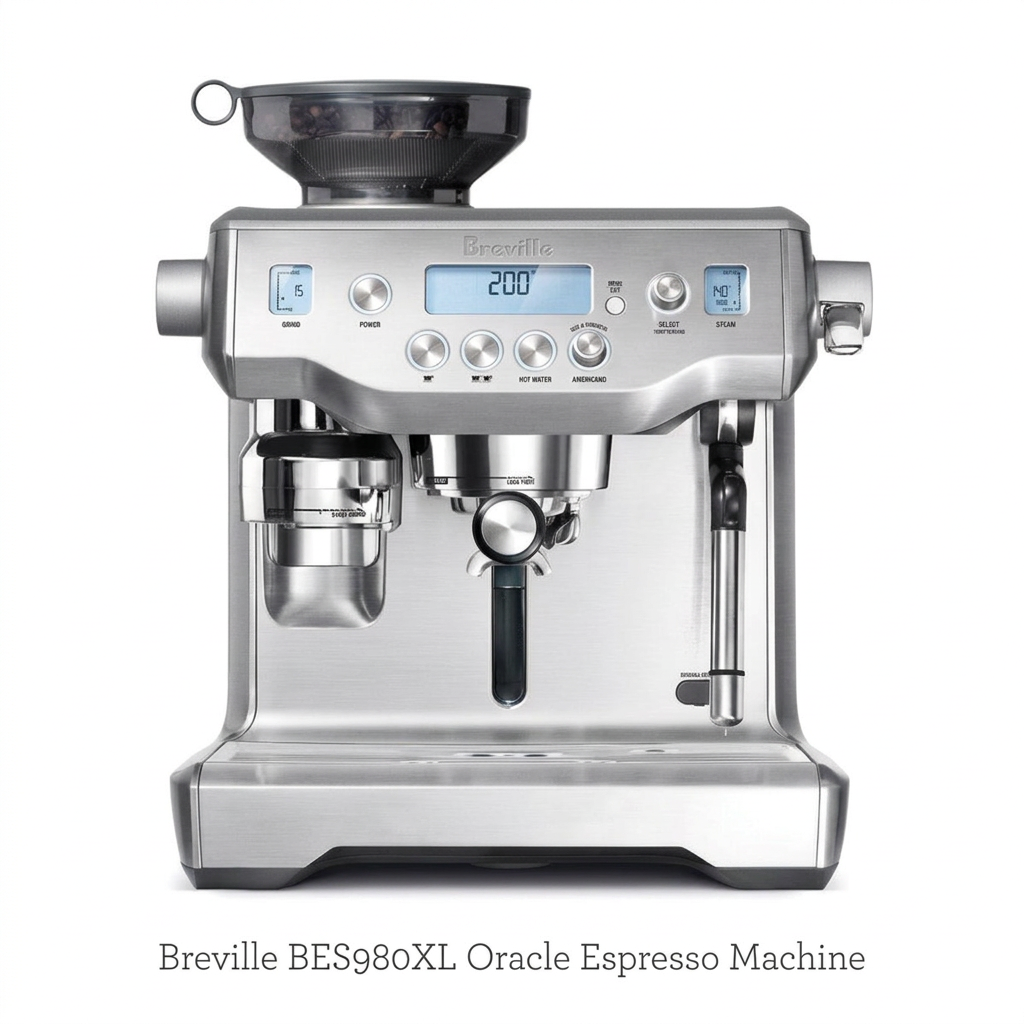
The full package: LCD, physical buttons, 58 mm group and steam wand.
Other Breville machines I tested
If you'd like a touchscreen with saved drinks, see my Breville Oracle Touch review.
For cold brew and the latest ThermoJet heating, read my Breville Oracle Jet review.
For a smaller hands-on machine, see the Barista Pro review.
Which one is right for you: is the Breville Oracle your match?
4 quick questionsBreville Oracle specifications
From manufacturer data and my own testing.
How I tested and scored the Breville Oracle
For four weeks, I used the Breville Oracle as my everyday coffee machine for espresso, americanos, long blacks, flat whites, lattes and cappuccinos.
I dialed in light, medium and dark roasts, adjusted brew temperature and pre-infusion, programmed the shot and americano buttons and logged every double shot.
I steamed whole, 2%, oat, almond and soy milk at different temperatures and textures, and followed every daily, prompted and descaling routine.
I then checked my notes against Breville's specifications and owner documentation.
- Espresso (8.9): body, crema, flavor and shot-to-shot consistency.
- Milk drinks (8.6): foam texture, temperature control and speed.
- Ease of use (8.6): automation, buttons, programming and warm-up.
- Cleaning (8.3): daily wiping, purge, clean cycles and descaling.
The overall score of 8.6 is an editorial rating that reflects those four areas.
Breville Oracle FAQ
Is the Breville Oracle worth it?
Yes, if you want café-quality espresso and milk drinks with very little skill and you prefer physical controls to a touchscreen.
Does the Oracle tamp automatically?
Yes. It grinds into the 58 mm basket, tamps with consistent force and finishes with a polishing twist.
How long does the Oracle take to heat up?
About five minutes from cold. Use the auto-start so it is ready when you want coffee.
Can it brew and steam at the same time?
Yes. It has a dedicated brew boiler and a dedicated steam boiler.
How does the americano program work?
A hot water outlet behind the group head adds water after the shot. You program the espresso and water volumes once, then make the drink with one press.
What milk temperatures can I set?
From about 130°F to 170°F, with 150°F as the default.
Does the Oracle have a touchscreen?
No. It uses a backlit LCD with physical buttons and dials.
How big is the water tank?
About 84 ounces, or 2.5 liters, with a front fill door and a removable rear tank.
Can I use distilled water?
Not on its own. Coffee needs minerals for flavor, and the boilers use them to sense water level. Use filtered tap water or a mix.
How do I move the Oracle?
Turn the dial behind the drip tray to lower a built-in roller, then slide the machine.
Is the Sage Oracle the same machine?
Yes. The Sage Oracle sold in Europe is the same machine.
Kitchen & coffee tester
Michael spent six years as a line cook in restaurants in Chicago and New York, and he has tested kitchen appliances for HouseholdMe since 2018, from air fryers to coffee makers. He holds an SCA certificate in barista skills and used the Breville Oracle as his everyday coffee machine for four weeks for this review, working from testing notes he compiled together with the HouseholdMe team.
- Four weeks of hands-on testing of the Breville BES980XL Oracle
- Breville product specifications and owner documentation
- General espresso brewing, water quality, milk texturing and maintenance guidance