ECOVACS WINBOT W2S Omni review: TruEdge corners, a triple-nozzle spray and a portable station that powers it anywhere
The ECOVACS WINBOT W2S OMNI Window Cleaning Robot pairs a square robot with a portable station that stores, powers and anchors it. Its TruEdge scrubber cleans unusually close to the frame, its spray handles dirty outside glass well and it runs on battery for 110 minutes, but you still wash the pads by hand and the station is no lightweight.

Emily Carter
Hands-on review
Hands-on testing, research, specs
4 weeks
20 minutes
Jargon helpNew to window robots? Tap any dotted term to see what it means.
In this review
Yes, if you want edge-to-edge cleaning on big windows without paying for pad washing. The WINBOT W2S Omni cleaned heavily stained glass well, reached closer to the frames than most robots thanks to TruEdge, and its portable station meant I could clean windows nowhere near an outlet. You still rinse the pads in the sink, the station is heavy to carry upstairs, and on a few small windows it is overkill.
WINBOT W2S Omni at a glance
WINBOT W2S Omni pros and cons
- TruEdge scrubber cleans close to frames and corners
- Strong results on heavily stained outside glass
- Battery station lets you clean away from outlets
- Pads still need washing by hand
- Station is heavy to carry between floors
- Best suited to flat, rectangular glass
Who should buy the WINBOT W2S Omni?
- Homes with large windows and sliding doors
- Outside and high windows far from outlets
- Glass partitions with small gaps between panels
- Anyone who hates washing pads after each job
- A few small windows you can reach easily
- Arched or unusually shaped glass
First impressions of the ECOVACS WINBOT W2S Omni
The ECOVACS WINBOT W2S Omni arrives looking more like a tidy toolbox than a gadget.
The robot slides into a white station with a carry handle, and everything else, from the tether to the solution bottle, has its own pocket.
That matters more than it sounds. Window robots tend to come with a tangle of cables, a loose safety rope and a bottle that rolls around the closet.
This one packs away like a single appliance.
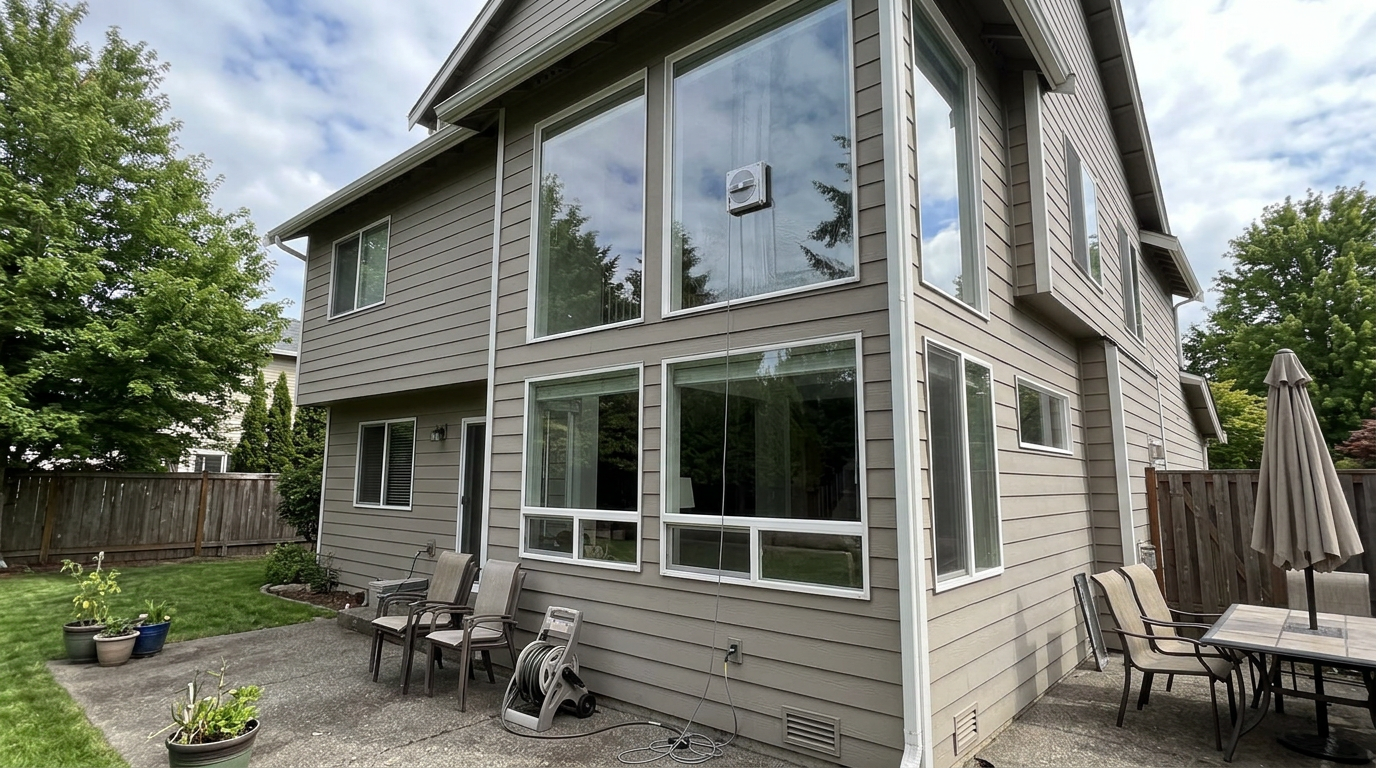
My first job was the dirtiest window in the house: the upstairs pane above our patio, which collects pollen, dust and rain spots all year.
I filled the solution, wet and wrung out the pad, set the station flat on the bedroom floor and pressed the robot to the outside of the glass.
A voice confirmed it was attached, and it set off for the top corner.
Twenty minutes later the window looked like it had been cleaned by hand, including the strip along the frame that robots usually miss.
Over four weeks, that became the pattern: big windows done properly, edges included, with me mostly out of the room.
The other early surprise was how little I had to think about it. After the first run, the robot remembered its settings, and every later job was press, wait, lift.
Within a week, my partner was using it without asking me how, which is the real test of any home gadget.
The W2S Omni on our dirtiest upstairs window, high above the patio.
What the WINBOT W2S Omni actually is
The W2S Omni is a suction-based window robot with a square body, a wide microfiber pad✕Microfiber padA cloth made of very thin synthetic fibers that trap dust and grease. It is the part of the robot that actually wipes the glass. and a spray system that wets the glass ahead of the pad.
What makes it an Omni is the station.
ECOVACS calls it a 6-in-1 station because it carries the robot, holds the solution, stores the cable, powers the robot from its own battery, anchors the safety tether and gives you the main controls.
What the station does
| Job | How the station handles it | Why it matters |
|---|---|---|
| Storage | Robot docks inside, flap closes | One thing to carry and store |
| Power | Built-in battery or wall outlet | Clean windows nowhere near a socket |
| Cable | Retracts the tether at the press of a button | No tangles between windows |
| Safety | Anchors the tether, grips the floor with a suction cup | Stays put if the robot ever slips |
| Controls | Power and mode buttons on top | Run it without opening the app |
| Solution | Dedicated bottle and refill area | Refill without hunting for supplies |
The headline specs
ECOVACS rates the suction at up to 8,000 pascals✕Pascal (Pa)The unit used for suction. Home window robots range from about 2,500 Pa to 10,000 Pa., enough to hold it firmly on outside glass.
Navigation uses WIN-SLAM✕WIN-SLAM navigationECOVACS name for the robot mapping system. It measures the window first, then plans a tidy back-and-forth route instead of wandering. 4.0, and the battery is rated for about 110 minutes.
The tank holds about 80 ml of solution, and ECOVACS quotes up to 65 square meters of glass in Fast mode on a charge.
WINBOT W2S Omni design and setup
The station feels sturdy and well made, with a matte finish that hides fingerprints.
Its carry handle has a second job: lift it and it releases the big suction✕Suction (Pa)How hard the fan pulls the robot against the glass, measured in pascals. More pascals means a firmer grip, which matters most on outside windows and big panes. cup under the station, so you can pick it up. Leave it down and the station grips the floor.
The power button and mode buttons sit on top. A rear compartment stores spare pads and the power cable, and the front holds instructions and the solution bottle.
App setup
Setup runs through the ECOVACS HOME app. You scan the QR code on the station, turn on Bluetooth and the app finds the robot.
You name it, pick a voice language and update the firmware, which I recommend before the first clean.
The whole process took me about 15 minutes, including the update.
Before each clean
Remove the robot, fill the solution reservoir with the included bottle without overfilling, and fit a pad that is damp and well wrung out.
Place the station on a flat, level, hard surface. That is not optional: the station anchors the tether.
Our tip: Update the firmware before your first window. It only takes a few minutes, and you start with the latest navigation and safety improvements.
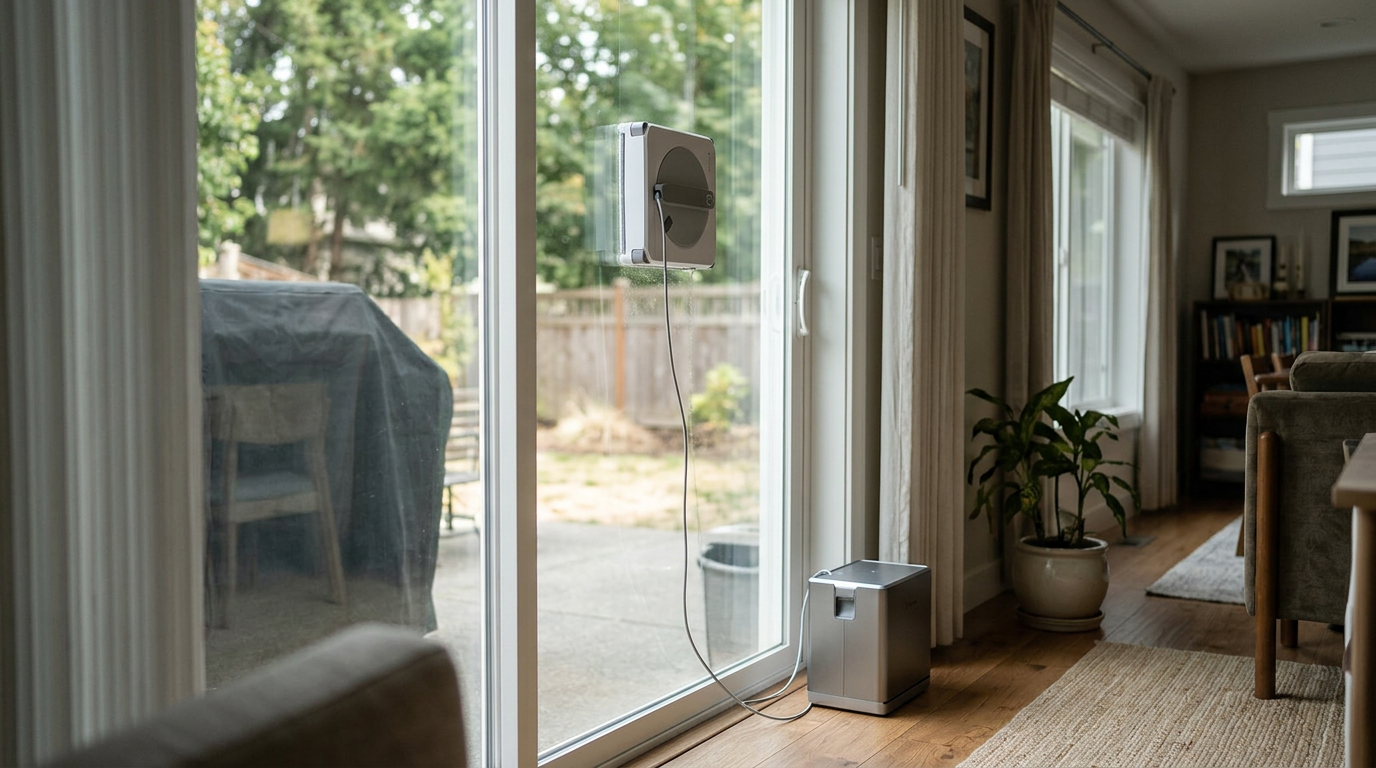
The station on the floor below the patio door, anchoring the tether while the robot works.
Suction, safety and trusting it on high glass
I watched the first few outside runs closely. By the second week, I trusted it enough to leave the room.
To attach it, you hold the robot against the glass and press and hold the power button. The fan spins up, the robot locks on and a voice tells you it is secure.
Only then should you let go.
The protection layers
ECOVACS describes a 12-level safety system. The bars show the order in which each layer acts.
The safety tether✕Safety tetherA strong cord that clips the robot to something solid indoors. If the robot ever lets go of the glass, the tether catches it before it can fall. runs from the robot to the station, and a locking clip adds protection on tall buildings.
Because the tether depends on the station, the station must sit on a stable, level surface. On a rug or a slanted step, the arrangement is weaker.
Low battery and end of job
When the battery runs low or the job is done, the robot returns to its starting point, announces it and holds on for up to 30 minutes.
That half hour is the difference between a relaxed retrieval and a sprint upstairs.
Spray system and cleaning pads
The W2S Omni has triple spray nozzles on both its left and right sides, so it always mists the glass in the direction it is about to travel.
That pre-wetting is what helps it shift dried dirt: the mist softens it, then the pad lifts it.
On our road-facing window, which had a winter of grime on it, this combination did more in one pass than I expected.
Getting the pad right
The pad must be slightly wet and thoroughly wrung out before every session.
Too wet, and it smears and drips. Too dry, and it drags dirt across the glass instead of lifting it.
After a few windows I found the sweet spot: damp to the touch, with no water when I squeezed it again.
My cleaning ratings on the same window, out of 10.
Our tip: Swap to a spare pad halfway through a whole-house session. One dirty pad spreads grime onto the next window you clean.
How well the WINBOT W2S Omni cleans
This was the most impressive part of my test.
On heavily stained glass, the W2S Omni often cleaned the window in a single back-and-forth pass.
Ordinary dust, fingerprints and rain marks came off easily, and windows that had not been touched in months came back clear.
It also worked on small windows, not just the large doors it is clearly designed for.
My ratings on a 10-point scale, Thorough inside and Heavy-Duty outside.
Glass with joins and gaps
One thing surprised me. Our home office has a glass partition made of several panels with thin gaps between them.
Many robots stop or lose grip at those joins. The W2S Omni kept its suction across the small separations and carried on along its path.
It is not built for wide gaps or raised strips, but small joins between panels did not faze it.
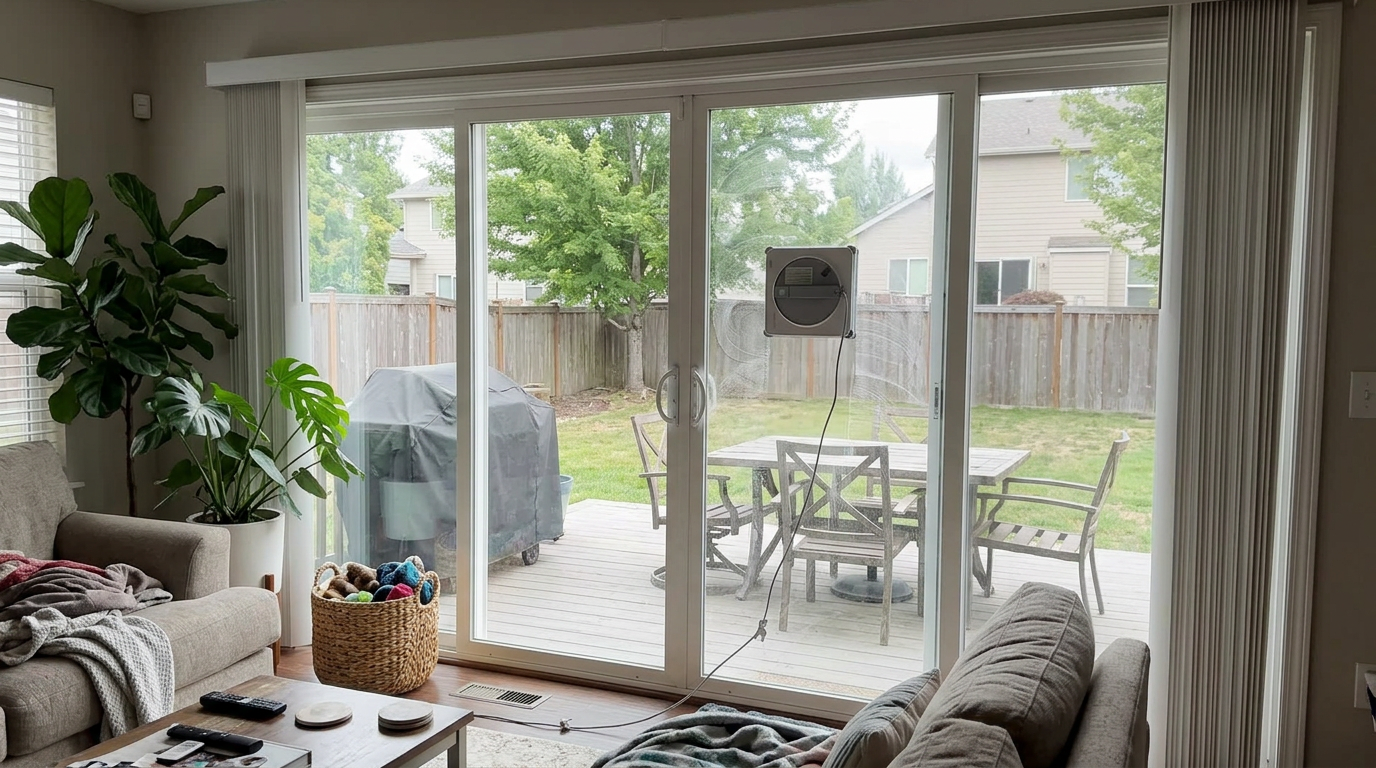
The living room sliding doors, which the W2S Omni cleaned edge to edge in one Thorough run.
TruEdge: cleaning right up to the frame
Most window robots leave a dirty border because the pad cannot reach right into the frame.
TruEdge✕TruEdgeECOVACS edge-cleaning system. Small spinning brushes reach into the strip of glass next to the frame that a flat pad cannot touch. is ECOVACS answer, and it works.
As the robot approaches a frame, a scrubber lowers onto the glass and spins at up to 200 RPM along the edge.
Two small posts at the front of the robot detect the edge, so it turns before driving onto the frame, then cleans along it.
ECOVACS calls the result quad-edge cleaning: all four sides of the window get attention, not just the top and bottom.
My cleaning ratings by part of the window, out of 10.
The very tip of some corners still needed a wipe, but far less than with any round or dual-pad robot I have used.
Our tip: Use Edge mode as a finishing pass on sliding doors. Fingerprints collect at handle height near the frame, and a second edge run clears them.
Cleaning outside windows from indoors
The biggest change the W2S Omni made to my routine was cleaning the outside of upstairs windows without a ladder.
Our upstairs windows tilt in for cleaning, but reaching the far side of the outer pane by hand was always a stretch.
With the robot, I opened the window, pressed it to the outside of the glass, closed the window as far as the tether allowed and let it work.
The station sat on the bedroom floor inside, anchored and out of the weather.
What outside glass throws at it
Outside windows collect a different kind of dirt from inside ones.
Pollen and dust sit loosely on top. Rain spots dry into hard rings. Near a road, a gray film builds up that a quick wipe barely touches.
The triple spray softened all of that before the pad passed, and Heavy-Duty mode made two or three slow passes over each stripe.
My ratings on a 10-point scale, Heavy-Duty mode with a fresh pad.
Bird droppings are the one thing I would always remove by hand first. A robot will smear them before it lifts them.
Our tip: Check the weather before an outside run. Cleaning in direct, hot sun dries the mist too fast and can leave streaks; an overcast morning gave me the best finish.
Battery, power and moving between windows
A full charge gives about 110 minutes of continuous cleaning.
In practice, that covered all our downstairs glass and most of the upstairs in one session.
For a big job you can run it plugged into the wall, so the battery is never the limit.
The app shows the battery level, and I liked being able to check it from the next room.
How far one charge goes, based on the rated figures. Heavier modes cover less glass.
The trade-off is weight. The station is solid and heavy, which helps it stay put, but carrying it between floors is a two-handed job.
Our tip: Work room by room on one floor before moving the station. It saves trips up and down the stairs.
Removing the robot and putting it away
Removing the robot is as simple as attaching it.
Hold it firmly, press and hold the power button, wait for the voice prompt that it is releasing, then lift it off.
Align it with the station, slide it in, press the cable button to retract the tether and close the flap.
| Step | What I do | Why |
|---|---|---|
| 1. Hold | Grip the robot with one hand | It drops once suction stops |
| 2. Release | Press and hold power | Voice confirms it is letting go |
| 3. Lift | Take it off the glass | Wipe the parking mark if needed |
| 4. Dock | Slide it into the station | Protects the pad and sensors |
| 5. Retract | Press the cable button | Tether winds back in |
| 6. Close | Shut the storage flap | Ready to carry |
Then the one job the station does not do: peel off the dirty pad and rinse it.
Cleaning and maintaining the W2S Omni
Upkeep is simple, but it is hands-on.
Rinse the pad after every session and let it air-dry. A spare means you are never waiting for one to dry.
Wipe the edge sensors✕Edge detectionSensors that tell the robot it has reached a frame or the edge of the glass, so it turns around instead of driving off. and the underside of the robot now and then, especially after outside windows.
| When | Task | Why it matters |
|---|---|---|
| After each session | Rinse the pad, let it dry | Stops grit spreading next time |
| After outside windows | Wipe the sensors and underside | Keeps edge detection accurate |
| Each refill | Use the recommended solution | Avoids foam and clogged nozzles |
| Weekly in heavy use | Check the TruEdge scrubber | Clears hair and fibers |
| Before storage | Charge the station | Ready when a window bothers you |
My estimate of hands-on cleanup and wiping per session.
What using it is really like
Once set up, a normal session took me about three minutes of preparation and a minute or two of cleanup.
The fan is clearly audible in the same room, a steady whoosh, but it never drove me out.
I usually ran it while folding laundry or answering emails nearby.
The voice prompts are genuinely useful. They tell you when it is attached, when it is done and when the battery is low.
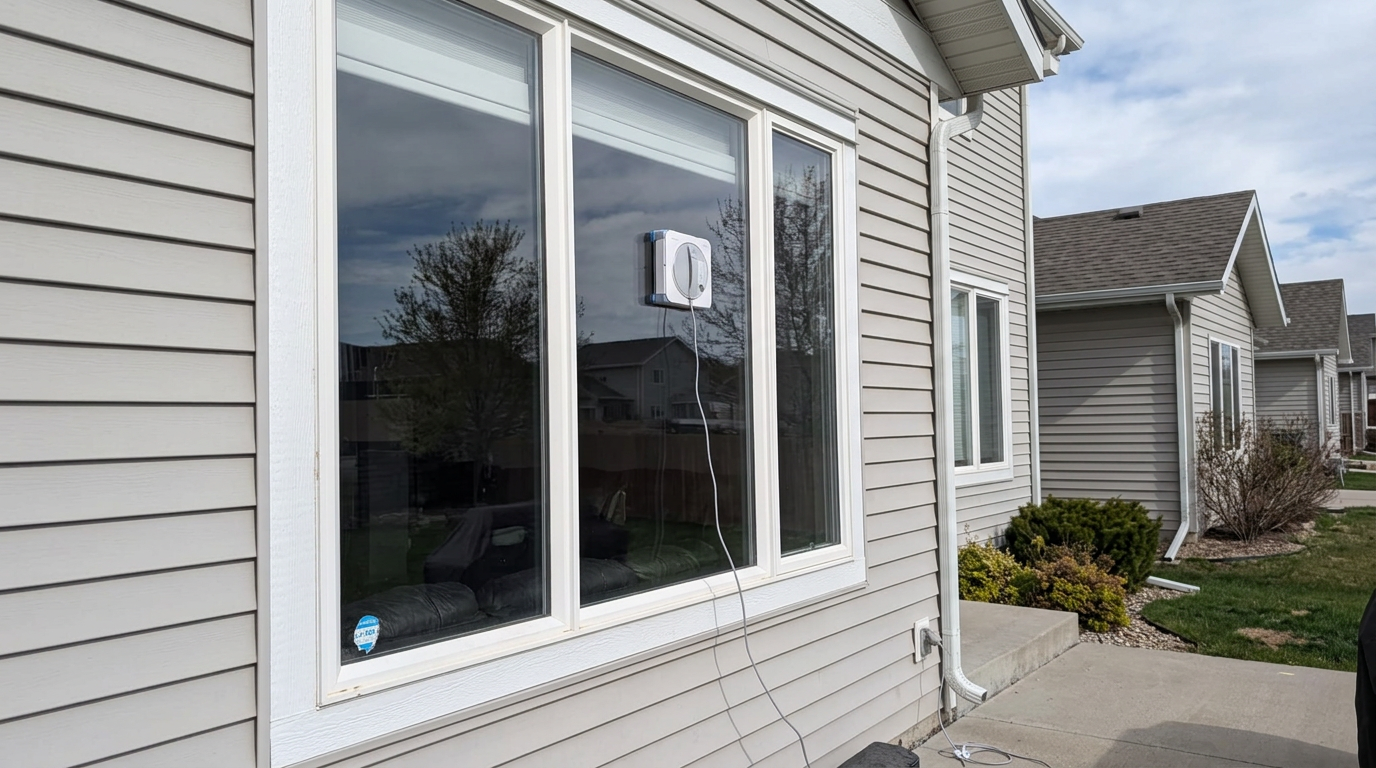
A side window by the driveway, one of the panes that used to get skipped.
Our tip: Clean the window that bothers you most first. When that one is clear, the robot quickly becomes a habit rather than a gadget.
The W2S Omni versus cleaning windows by hand
I cleaned two identical sliding doors side by side: one by hand with a cloth and squeegee, one with the robot on Thorough.
By hand, I was faster on the first door. I am practiced, and there is no setup.
By the third door, the picture changed. My arms were tired, my edges were getting sloppy and the robot was still cleaning at the same steady pace.
Where each one wins
| Task | By hand | W2S Omni |
|---|---|---|
| One small window | Faster | Slower, because of setup |
| A whole floor of windows | Tiring, uneven by the end | Consistent from first to last |
| High outside panes | Ladder or awkward stretching | From inside, tethered |
| Edges and corners | Precise if you take care | Very close, tips may need a wipe |
| Stubborn spots | Easy to scrub harder | Remote or a second pass |
| Your effort | All of it | Setup and pad rinsing |
The robot did not beat me on a single small window. It beat me on every session longer than about three windows, and on anything I had to reach for.
My hands-on time, relative to cleaning eight windows by hand.
Who will enjoy it most
If windows are the chore you put off, the W2S Omni removes most of the effort and almost all of the reaching.
If you enjoy a quick wipe of a few small panes, you will find the setup slower than doing it yourself.
The sweet spot is a house with plenty of glass, a couple of awkward windows and an owner who would rather do something else on a Saturday.
Our tip: Batch your windows. Set the station up once and clean every window in that room and the next one before you pack it away.
Which windows and surfaces it suits
ECOVACS designs the W2S Omni for framed, frameless and tilted flat glass.
| Surface | How it went | My verdict |
|---|---|---|
| Sliding glass doors | Even, fast, edges included | Excellent |
| Large picture windows | Systematic top-to-bottom route | Excellent |
| Upper-floor outside windows | Secure with tether and station anchored | Very good |
| Glass partitions with small joins | Kept suction across the gaps | Very good |
| Small rectangular windows | Works well, more setup than wiping by hand | Good |
| Arched or unusual shapes | Square body cannot reach every part | Fair |
Frameless glass✕Frameless glassGlass with no raised frame around it, such as a shower screen, a mirror or a glass balcony rail. The robot must detect the drop-off with sensors instead of bumping into a frame. works because the robot detects the edge with sensors rather than needing a frame to bump into.
Supplies and long-term ownership
Beyond the robot itself, you keep two supplies on hand: pads and cleaning solution.
The pads are washable and reusable. With two in rotation, I always had a dry one ready.
Solution use depends on the mode. Heavy-Duty and Deep spray more than Fast.
ECOVACS recommends its own solution, and I used only that. Some household cleaners foam or leave a film that can clog nozzles.
After four weeks, the robot cleaned as well as it did on day one, with no loss of suction and no change in its route.
The station shows no wear either, apart from a few scuffs on the base from moving it between rooms.
Noise, pets and family life
Like every suction-based window robot, the W2S Omni has a steady fan noise.
It is about as loud as a hair dryer on low. In the same room you notice it; in the next room it fades into the background.
Our cat was wary on day one and ignored it by day three. She never touched it on the glass.
With children around, keep the tether and station out of reach while it runs, and let the voice prompts tell everyone when it is safe to lift it off.
The robot is also a surprisingly good conversation piece. Visitors always stop to watch it work its way down the patio door.
Living with it: week one to week four
Week one was setup, the app and inside windows on Fast and Thorough, with me watching every run.
Week two moved outside. I learned to place the station properly and to start dirty glass on Heavy-Duty.
Week three was the office partition and the small windows, where it handled the panel joins better than expected.
Week four was routine: one or two windows at a time, whenever they caught the light.
My overall satisfaction each week, out of 10.
What surprised me, good and bad
The biggest good surprise was the glass partition in my home office. I expected the robot to stop at the first join between panels, and it simply kept going.
The second was how quickly I trusted it outside. With the station flat on the floor and the tether clipped, I was leaving the room by the second week.
The less welcome surprise was pad upkeep. On outside glass, pads got dirty fast, and rinsing them became a fixed part of every session.
And the station is heavier than it looks in photos. On a day when I cleaned both floors, I felt it.
How each detail compared with my expectations before testing.
Common mistakes to avoid
The WINBOT W2S Omni is straightforward, but these habits hurt results.
| Mistake | What happens | Better habit |
|---|---|---|
| Soaking-wet pad | Smears and drips | Wet it, then wring it out well |
| Station on carpet or a slope | Weak tether anchor | Use a hard, level floor |
| Letting go before the voice prompt | Robot may not be secure | Wait for attached confirmation |
| Overfilling the reservoir | Spills into the robot | Fill to the line with the bottle |
| Fast mode on neglected glass | Faint haze left behind | Use Heavy-Duty or Deep first |
| Reusing a dirty pad | Grime spread to clean glass | Rinse or swap pads |
What I would change
Pad washing in the station would make it nearly perfect.
A lighter station would help for multi-story homes.
Is the WINBOT W2S Omni worth the money?
For homes with lots of glass, yes.
It is a premium appliance for a specific job, so judge it by how much glass you have and how often it actually gets cleaned.
If you regularly pay for professional window cleaning, compare those visits over a couple of years with buying the robot.
If you have a few small, easy windows, you will not use it enough.
Ask yourself three questions. Do you have large windows or sliding doors? Are some of them high or far from an outlet? And are you fine rinsing a pad after each session?
Three yeses make the W2S Omni an easy recommendation.
Where your money goes
Much of what you pay for is the station, and it earns its keep.
Without it, you would be running an extension cord to every outside window, carrying a loose tether and storing a bottle, a cable and a robot separately.
With it, you carry one case, clean anywhere for nearly two hours and pack everything away in a minute.
The other big piece is TruEdge. Edges are where cheaper robots disappoint, and they are exactly what you notice when the sun hits the glass.
What you do not get is pad washing. If that is the chore you most want gone, the step up to the W3 Omni is worth considering.
How it compares with other ECOVACS window robots
ECOVACS sells several station models, and the differences come down to pad washing, suction and edge technology.
| Feature | WINBOT W2S Omni | WINBOT W3 Omni | WINBOT W2S PRO Omni | WINBOT MINI 2 |
|---|---|---|---|---|
| Station | 6-in-1 portable, battery | Self-washing, battery | Portable, battery, display | None, corded |
| Max suction | 8,000 Pa | 8,000 Pa | 10,000 Pa | 8,000 Pa |
| Edge cleaning | TruEdge scrubber | TruEdge scrubber | TruEdge 2.0 brushes | Four corner brushes |
| Pad washing | By hand | Automatic | By hand | By hand |
| Rated battery | 110 min | 130 min | 110 min | Backup only |
| Best for | Big glass, edges included | Least cleanup | Strongest grip | Small windows |
| Your home | Is the W2S Omni a fit? | Why |
|---|---|---|
| Large windows and sliding doors | Excellent | Edge-to-edge results on big glass |
| Windows far from outlets | Excellent | Battery station |
| Glass partitions | Very good | Holds suction over small joins |
| A few small windows | Fair | More than you need |
| You hate washing pads | Fair | Pad washing is manual |
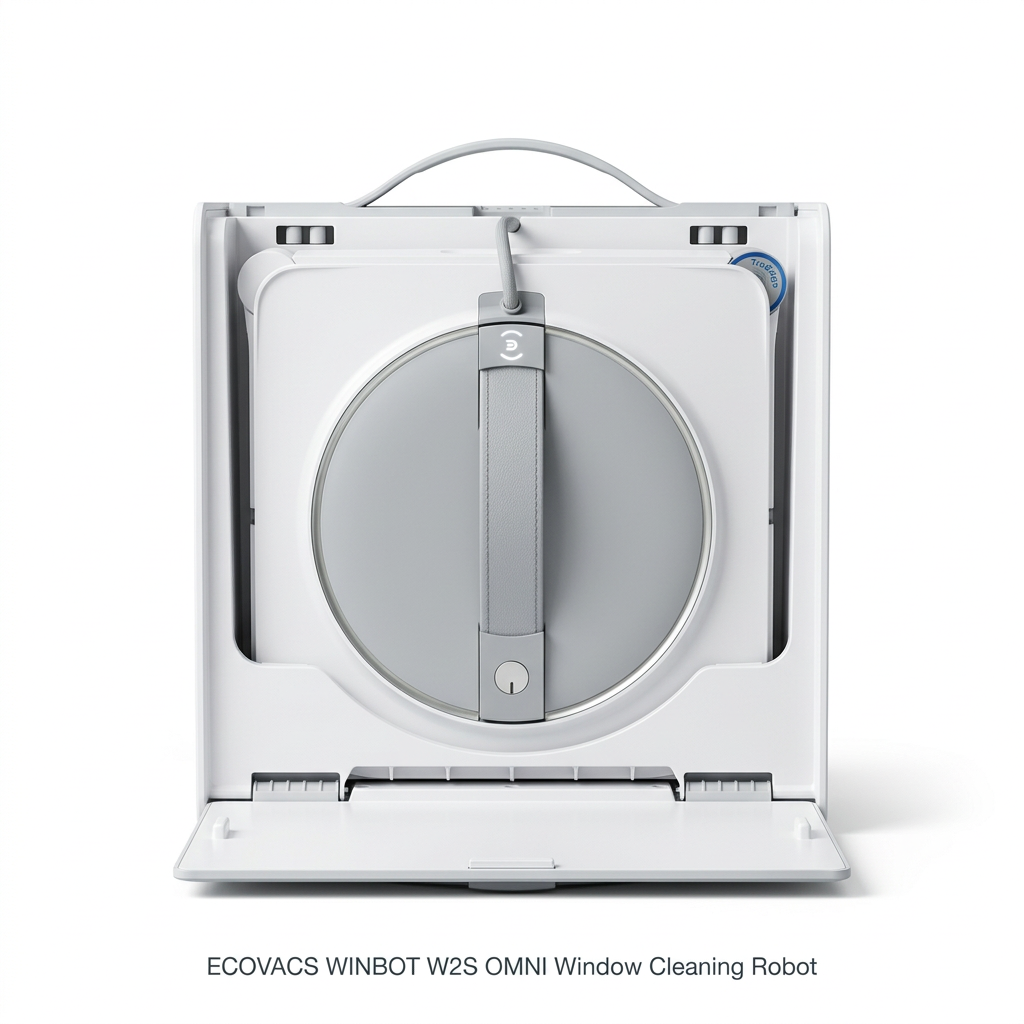
The robot docked in its station: everything you need in one case.
Other ECOVACS window robots I tested
If you want the station to wash the pads too, read my WINBOT W3 Omni review.
For more suction and TruEdge 2.0, see my WINBOT W2S PRO Omni review.
For smaller windows and easy storage, my WINBOT MINI 2 review covers the compact option.
Which one is right for you: is the WINBOT W2S Omni your match?
4 quick questionsWINBOT W2S Omni specifications
From manufacturer data and my own testing.
How I tested and scored the WINBOT W2S Omni
For four weeks, I used the WINBOT W2S Omni for every window in my house, inside and out, plus a glass office partition.
I tried all five modes, cleaned heavily stained outside glass and recently cleaned inside windows, and ran it on battery and plugged in.
I timed setup and cleanup, tested how it behaved at the end of a job and on low battery, and tracked how much I still wiped by hand.
I then checked my notes against ECOVACS specifications and owner documentation.
- Cleaning (8.7): dust, pollen, fingerprints, rain marks and neglected outside glass, across all five cleaning modes.
- Edge coverage (8.6): how close TruEdge gets to frames and corners, and how much I finished by hand.
- Ease of use (8.6): app setup, the station controls, attaching and removing the robot, cable handling and storage.
- Safety (9.0): suction, the tether and locking clip, the station suction cup and power-loss behavior.
The overall score of 8.6 is an editorial rating that reflects those four areas.
WINBOT W2S Omni FAQ
Is the ECOVACS WINBOT W2S Omni worth it?
Yes, for homes with large windows, sliding doors or glass far from outlets. It cleans close to the frames and runs on battery. If you want automatic pad washing, look at the W3 Omni.
Does the W2S Omni wash its own pads?
No. The station stores, powers and anchors the robot, but you rinse the pads by hand.
How long does the battery last?
About 110 minutes on a full charge. You can also run it plugged in for longer sessions.
How strong is the suction?
ECOVACS rates it at up to 8,000 Pa.
What is TruEdge?
A scrubber that lowers near the frame and spins at up to 200 RPM, so the robot cleans the strip of glass along the edges.
What cleaning modes does it have?
Fast, Thorough, Deep, Heavy-Duty and Edge, plus a remote control in the app.
Can it clean frameless glass?
Yes. It is designed for framed, frameless and tilted flat glass and detects edges with sensors.
Is it safe on upper-floor windows?
It uses strong suction, a tether to the station, a locking clip and a station that grips the floor. Always place the station on a flat, hard surface.
What happens when the battery is low?
It returns to its starting point, alerts you and holds on for up to 30 minutes.
Can it cross gaps between glass panels?
It kept its suction over the small joins in my glass partition. Wide gaps or raised strips will stop it.
Do I need the app?
For setup and extra modes, yes. Day to day, the station buttons cover the basics.
How do I store it?
Dock the robot in the station, retract the cable with one button and close the flap.
Senior home appliance tester
Emily has tested home appliances for a living since 2016, including five years as a test coordinator at a national consumer advocacy group, and has run HouseholdMe's cleaning tests since 2021. She has a degree in industrial design, so she looks at how a product is built, not just how it performs. She used the WINBOT W2S Omni on every window in her house, plus a glass office partition, for four weeks for this review.
- Four weeks of hands-on testing of the ECOVACS WINBOT W2S Omni
- ECOVACS product specifications and owner documentation
- General window-cleaning and robot-safety guidance